Some deliveries may take a little longer than usual due to regional shipping conditions.

DOWNLOAD THE APP


Customer Services
Copyright © 2025 Desertcart Holdings Limited
DOWNLOAD THE APP

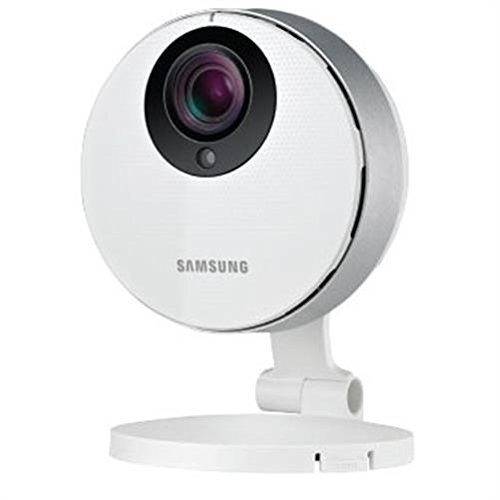
👁️🗨️ See More, Know More, Worry Less — Your Smart Home Guardian
The Samsung SNH-P6410BN SmartCam HD Pro is a feature-rich indoor Wi-Fi security camera delivering 1080p Full HD video with a 128° ultra-wide lens and night vision up to 16 feet. It offers advanced motion and audio detection with customizable alert zones, two-way talk via smartphone, and local microSD storage up to 64GB—no subscription fees required. Designed for professionals and families alike, it provides reliable remote monitoring with crisp video quality and smart notifications to keep you connected to what matters most.
| ASIN | B00J38NVHE |
| Alert Type | Motion Only |
| Batteries Required? | No |
| Best Sellers Rank | #4,485 in Webcams & VoIP Equipment #6,893 in Dome Surveillance Cameras |
| Color | White |
| Compatible Devices | Smartphone |
| Connectivity Protocol | Wi-Fi |
| Control Method | App |
| Controller Type | Android |
| Customer Reviews | 3.5 3.5 out of 5 stars (1,165) |
| Date First Available | March 18, 2014 |
| Department | baby-boys |
| Effective Still Resolution | 2 MP |
| Effective Video Resolution | 1080 Pixels |
| Form Factor | Dome |
| Frame Rate | 30 frames per second |
| Global Trade Identification Number | 06950207324291 |
| Included Components | Pwer Adapter; Ferrite Core; Network Cable; Mounting Tape; 3 x Mounting Screws and Anchors; |
| Indoor/Outdoor Usage | Indoor |
| International Protection Rating | IP65 |
| Is Discontinued By Manufacturer | No |
| Item Weight | 4.2 ounces |
| Item dimensions L x W x H | 5.51 x 3.94 x 8.46 inches |
| Item model number | SNH-P6410BN |
| Light Source Type | Infrared |
| Low light technology | Night Color |
| Manufacturer | Samsung |
| Material | Plastic |
| Mounting Type | Wall Mount |
| Night Vision Range | 16 Feet |
| Number of Channels | 2 |
| Number of Items | 1 |
| Photo Sensor Technology | CMOS |
| Power Source | Corded Electric |
| Product Dimensions | 5.51 x 3.94 x 8.46 inches |
| Room Type | Classroom, Kitchen, Living Room, Office |
| Specific Uses For Product | Interior space. |
| UPC | 761768030981 603895773372 799959967204 849688001639 617999488452 |
| Unit Count | 1.0 Count |
| Video Capture Format | 1080p |
| Video Capture Resolution | 1080p |
| Viewing Angle | 128 Degrees |
| Voltage | 5 Volts |
| Wattage | 11 watts |
| Wireless Communication Technology | Wi-Fi |
| Zoom Type | Yes |
L**A
this is the best surveillance camera in its price class if you want ...
I've read most of the reviews and questions-and-answers before buying this SmartCam, and now I've been using it for over a week and feel that I owe it to you guys (and all the new visitors) to write up my own experiences. In one sentence, this is the best surveillance camera in its price class if you want network-connected monitoring and recording. If you don't need network connectivity, look for a simpler and more robust system. You should not believe the hype, especially the pictures, that are used to sell SmartCam. No surveillance camera with a wide angle immovable lens the size of a pinhead is going to produce the gorgeous flawless and flat images that you see in the promotional pages at Samsung or here or elsewhere. These lenses hugely increase the area they cover at the expense of the clarity and detail in the image. If you use a good quality consumer camcorder to film someone 20 feet away, you'll see the frost on his beard. With this camera, and any other in its class, you'll be lucky if you can tell whether he is laughing or scowling. At 30 feet you may recognize the face of someone you know, but as court or police evidence the image will be useless. I am not knocking SmartCam, I am telling you not to trust the hype. When you see your child at the other end of the room via SmartCam monitoring, you may not know that she's crying, or that the babysitter is angry. Another thing to take with a grain of salt is the claims that it's very easy to set up and learn. Nothing on a home LAN is easy to configure, and this is no exception. If you're extremely lucky, everything may just work, and you'll see an image. Even so, you'll have to experiment and scratch your head, and find the manual online (there's none in the box) and read other people's posts before you learn to do everything the description says can be done with SmartCam. I am a professional programmer, I replace my own hard drives, and I've gone through half a dozen routers before I found one that I like, so I do have experience. It took four days and a call to Samsung techsupport before I said to myself that I know how to use this baby. It doesn't help that some of the things can be done only if you use a desktop browser with a special Samsung plug-in; some of the things you can do with an iPad app; and some of the things you can do with an Android app. These are not the same things, and they are not done the same way. The desktop browser may tell you that your motions sensitivity setting is 2, but the Android app calls that setting 553. And if you are really nerdy and learn how to connect directly to the cam from your desktop browser (bypassing the Samsung Web site), you'll be even more puzzled. Now if you're ready to deal with all that, here are the great things about SmartCam SNH-P6410BN. It takes the best quality video in its class. It is accessible over LAN and over the Web. There is a plugin for connecting to it with all major desktop browsers, Mac or Windows, and apps to connect to it from iOS and Android tablet or phone. You can record video on a micro SD card--hours of it on a little thing smaller than your thumbnail. You can play back this video on your desktop with Windows Media Player or Mac OSX player. If you know how to edit video, you can cut and paste clips together. You can set SmartCam to record continuously and to overwrite the older recordings when the card is full. You can set it to record only when motion is detected, in which case it will record short clips only when something is happening in front of it. It performs great in low light: with only a 10-watt LED bulb over my porch, I see clearly what's going on in the 40 feet by 40 feet area in front of the house. At night the motion sensors were triggered by moth because I had the cam close to the light, but when I moved it away, the false alarms became almost non-existent. You can define the area that the motion sensors are watching, and so the tree branches that are moving in the wind on the periphery or above your patio will not trigger a recording. You can have still images of these detected-motion events uploaded automatically to your picasaweb dot com page, and then review them very quickly from anywhere on the Web. This is much faster than doing the same through samsungsmartcam dot com. That's how I saw that a package was delivered to my porch: I was at the book store, connectd to my Google Plus account, scanning through the photographs on picasaweb, and I saw a still image of a man approaching my front door; there was a time stamp (to a second). I then went to samsungsmartcam dot com, logged in, clicked a few buttons and watched the video of the delivery process. I heard the thump of the box on the porch. Again, note that not all of this is possible with an iOS or Android device. Mostly you'll want to use a desktop browser with a plugin. Tablet apps are useful for little other than live monitoring while you are within your wifi router range. Even this is not always a smooth process: you will see the connection drop every now and then, for no apparent reason (and this with my gigabit LAN, well tuned and tested). I've been kicked out of the Samsung Web site, too, and forced to log in multiple times; I faced inexplicably missing controls on the Web page, and the like. Because the video and audio data from SmartCam goes to the Samsung Web site, and when you want to monitor the live video or to watch the recorded video, that video and audio data has to travel to your browser. When you watch most video clips on the Web, the data travels from the site's powerful server down to your computer; in this case, the trip is doubled: up from SmartCam, then immediately down to your browser. Your little SmartCam and your relatively slow home wifi network are responsible for sending that data to Samsung before Smasung can send it to you. I had to call techsupport to figure out why certain things were not working as they were supposed to, because nothing is obvious or well documented. There's an obscurely labeled check box that is not explained at all, and if you don't check it--and you might not, just because you don't really know what it does--then certain functions will appear not to work. Such things, and the lack of consistency across the various ways of accessing the cam video, make me think that this is work-in-progress. If Samsung doesn't abandon this model and really completes all programming, testing, and documentation, this will be the best product on the market for under $200. Here are the things I wanted to do and could not. Because my cam is mounted on the external wall (in an enclosure that I rigged up), it is awkward to have to get to the micro card every time I want to watch the video in my Windows Media Player. The cam is on the LAN, so you would expect to be able to open and copy a file from its SD card like you access any other computer's drive on the network. No way, period. You have to turn off the camera, pull the card out, bring it to your computer, copy the files, return the card to SmartCam, turn it back on, and make sure it has booted up properly and is feeding the video again. Luckily, you don't have to re-do any of the settings: when power returns, there's a delay of maybe 30 seconds, and then everything is working as before. So most of the time you watch the recorded video through a desktop browser (can't do this with an app). And in the browser, the timeline that's about 600 pixels long covers almost 24 hours. So dragging the playhead to an exact spot you want to watch takes a lot of hand-to-eye coordination. The programmers did the best they could to help (you see the current time displayed in a box as you drag the playhead), but still, I waste some time watching the portions that I don't need to watch. And there's nothing more tedious than reviewing surveillance video where nothing is happening. I wish I could click on a still image for a triggered event and have the playhead automatically move to that time point. Not possible. I also wish for a desktop application that would control the camera and give me access to the video. Because controlling a device on your LAN via a plugin in the browser is like running under water. But that application hasn't been written. Finally, I wanted to try and have video from SmartCam automatically uploaded to my YouTube account, as stated in some (not all) of the documentation. Couldn't do that. One probably shouldn't even try that because continuously uploading HD video will clog your home LAN. But I wanted to see if that was possible. When connecting with the iOS or desktop machine, I couldn't even find this option. It exists only in the Android app, but doesn't seem to do anything. I've seen a few people state, in the question-and-answer pages, that certain pro quality network recorders can, if you really tinker with them, record video from SmartCam. Those systems cost thousands of dollars, and if you own one of them, you probably won't be reading this because there are large-lens, movable-lens, zoomable-lens surveillance cameras that record real quality video as part of those enterprise-wide systems, with cables going through the walls, motorized anchors, and so on. I hope this is helpful. Buy SmartCam if you want all these features and are ready to tinker. Don't buy it if what you want is a small portion of its features, because with that rich set of features comes the complexity of learning and management, and the loss of a degree of reliability.
M**T
) The video quality is quite good (including night vision) and the Picasa image capture is ...
I have five of these cameras, sort of set up on a whim. The camera itself seems okay, although I had the issues mentioned on one with a 64GB card (I just put a 32GB card in that one and moved on.) The video quality is quite good (including night vision) and the Picasa image capture is a nice touch. I had trouble with the Wifi connection being unstable, but resolved that. Where I really had and still have a problem is the software. The website especially is completely intolerant of dropped packets, making it impossible to review captured video over a less-than-perfect network link. I would also like a way to download the captured video, but thus far I've not found one. (It's not terribly useful if all the captures are stuck in the camera.) For watching live video, at least, a workaround is to view the RTSP streams directly. I've had good luck with using VLC for that, although you do have to know enough to set up your network so that you can reach the camera from where-ever you are. The URL is "rstp://admin:[email protected]:554/profile5/media.smp" -- you can replace "profile5" with lower numbers for lower quality - I use profile2 when things are worst. ) It works.. and it works reasonably well, but I really wish the software was better. There's no real need for it to live on a third party web page in the first place (I guess to handle relay mode), and it needs to be a lot more tolerant of packet loss. The ability to download the video would be a "very nice to have", too. I can only give it three stars because of that - but the hardware seems solid enough.
J**L
Great camera, utterly horrible software!
I understood when I bought this camera that it was going upload images / video to Samsung, over the internet, so that they could then be downloaded and viewed on my mobile device(s) while I was away from home. And it can do that, privacy issues aside (see the 4-star review by Joe R.) But most people don't have enough upload bandwidth to do that with any real picture quality. Usually, upload speeds are a fraction of your download speeds, at least here in the US, so the software automatically reduces image quality to accommodate for upload speeds. But I bought the camera hoping that I could disable it's “phone home” capability and use it privately on my home network. And it turns out that you can do that, if you use it hardwired. Then, simply using Firefox (even under Linux), MSIE, Safari, maybe others, and a simple URL, (no plugins from Samsung required), you can get a beautiful 1920x1080 still images or even video. The first time I tried to use the camera, I followed the instructions and created an account with Samsung and downloaded their plugin... During setup, they will ask you to create a “private key” which Samsung sets as the 'admin' login password for the camera. It took a little sleuthing to find the camera's IP address (as it was DHCP assigned), but once you have that, just hit the camera's IP address with a WEB browser and you'll get a login screen. Use the private key as the password, and there is just (barely) enough software there to configure the camera with a static IP address. I also set non-existent IP addresses for the Gateway and DHCP servers (which keeps the camera from using the internet, but also prevents it from setting date/time). (Note: wireless can only use DHCP). Once you have a static IP address, you can hit the camera with simple HTTP requests. For example, if I assign the camera an IP address of 10.0.0.2 and type in the following URLs: [...] you will see a login screen (no parameters), or be rewarded with stunning 1920x1080, wide angle, stills (jpg) or video (mjpg). Specify 1 for the resolution and you'll get 1280x1024 images. It turns out that, under the hood, the camera is running some version of Linux and you can configure the camera using HTTP requests and a WEB browser. The problem is finding the Samsung document that describes the interface. (I never found anything specifically for this camera, but many of the commands used to control dozens of other Samsung cameras also work with this camera). The documentation suggest there might be many possible ways to use this camera, including the capability to upload images to an FTP server after motion detection, possibly upon motion detection with facial recognition? Shame on Samsung for not providing software to control all of these features or to use it within your private local area network! If you've ever used Panasonic cameras, you'll be horribly disappointed with the software provided by Samsung. I also recommend reading the 5-star review by Paulo H, Dr.Sc in Astrobiology, which discusses controlling the camera with rtsp as well as using iSpy with the camera. There are several reviews that discuss finding the Samsung Network Device API -- I never found anything specifically for this camera, only other cameras Samsung has made. Update: lowering to one because it crashes so often.
J**5
La caméra marche surement très bien mais l'application SmartCam ne marche pas du tout pour la gérer. Du coup il est impossible de s'en servir. Le fournisseur reconnait un bug. Impossible de recevoir des emails d'alerte. La notice est trop légère sur ce point. Pour l'aide, c'est soit la FAQ muette sur ce point, soit un numéro de téléphone aux USA. L'application ne marche pas non plus sur PC (à moins de prendre une vieille version d'IE, ne marche pas avec firefox malgré les dires du fournisseur).
D**A
Es la tercera que compro y va excelente. Rápida, buena definición, gran angular, estética muy buena y relación calidad precio excelente
O**E
très bonne caméra: angle large, l"infrarouge fonctionne très bien, le rendu est de bonne qualité, très facile à utiliser avec l'application, la sensibilité est plus délicate à régler (pour les alertes) mais sinon c'est parfait
A**B
Oui la caméra est belle, simple d'utilisation, oui les images sont de bonnes voire de très bonnes qualités... Mais le gros souci c'est que l'application censée gérer la caméra est nulle, mal faite. Ne perdez pas vos mots de passe de la caméra par exemple. Le suivi web est quasiment impossible, le site bug sur tous les navigateurs (safari, chrome, edge, firefox) et impossible de se connecter à wisenetlife.com. Bref, dirigez-vous sur un autre produit si vous ne voulez pas dépenser de l'argent pour rien.
B**T
j'ai déjà une netatmo présence pour l'extérieur et je vouslais ajouter une caméra pour l'intérieur. J'ai hésité à prendre la netatmo aussi mais j'ai vu sur que choisir que celle ci avait une bonne note alors j'ai tenté. Je suis globalement déçu, l'image est bonne c'est vrai et couvre un bon angle, on peut interagir avec une personne sur place via l'application façon talkie walkie, mais l'application n'est vraiment pas à la hauteur. Pas pratique à utiliser, elle bug régulièrement rendant un visionnage de séquence laborieux et le paramétrage tout autant. bref elle fait le job alors je la garde mais j'espère quand même une amélioration de l'application.
Trustpilot
2 days ago
1 month ago